Video conferencing software enables people to communicate through live video and audio over the internet without being in the same physical location. Businesses, educational institutions, healthcare organizations, government agencies, and other organizations use video conferencing platforms for meetings, customer communication, training, webinars, remote collaboration, consultations, interviews, and virtual events.
Modern video conferencing software goes beyond basic video calls. Today’s platforms can provide HD video and audio, screen sharing, meeting recording, chat, virtual collaboration, security controls, analytics, integrations, APIs, and flexible deployment options.
This guide explains what video conferencing software is, how it works, the different types available, important features, security considerations, cloud and on-premise deployment, and how organizations can choose the right video conferencing solution.
What Is Video Conferencing Software?
Video conferencing software is a digital communication solution that allows two or more people to communicate using real-time video and audio over the internet or a private network.
Depending on the platform, users can join meetings through a web browser, desktop application, mobile application, meeting room system, or integrated business application.
A modern video conferencing platform may combine:
- Video communication
- Audio communication
- Screen sharing
- Meeting recording
- Chat
- File sharing
- Digital whiteboards
- Collaboration tools
- Meeting analytics
- Security controls
- APIs and SDKs
- Business integrations
Video conferencing software is commonly used for:
- Business meetings
- Remote and hybrid work
- Customer meetings
- Online training
- Webinars
- Interviews
- Healthcare consultations
- Online education
- Government communication
- Virtual events
- Multi-location collaboration
The right solution depends on an organization’s users, meeting requirements, security policies, infrastructure, integrations, scalability, and budget.
How Does Video Conferencing Software Work?
Video conferencing software captures audio and video from a user’s microphone and camera, processes the media, and delivers it to other participants through a network.
A simplified video conferencing workflow is:
Camera and Microphone → Audio/Video Processing → Network → Conferencing Infrastructure → Participants
Browser-based video communication can use technologies such as WebRTC to support real-time audio and video communication.
The underlying system can involve codecs, signaling, media servers, networking infrastructure, security mechanisms, and bandwidth management.
1. User Authentication
The participant signs into the platform or joins a meeting using a meeting link, authentication method, or organizational identity system.
2. Meeting Connection
The platform establishes the meeting session and determines how participants should connect to the conferencing infrastructure.
3. Audio and Video Capture
The camera captures video while the microphone captures audio. The software processes these streams before transmission.
4. Media Transmission
Audio and video streams are transmitted through the network to the conferencing infrastructure and other participants.
5. Real-Time Processing
The platform manages video quality, audio processing, bandwidth, latency, noise reduction, and other factors affecting meeting quality.
6. Collaboration
Participants can share screens, documents, presentations, chat messages, whiteboards, and other content depending on the platform.
Organizations building or evaluating real-time communication systems can also refer to the W3C WebRTC specification for information about browser-based real-time communication capabilities.
Types of Video Conferencing Software
Organizations can choose from several types of video conferencing solutions depending on their infrastructure and business requirements.
Cloud-Based Video Conferencing
Cloud video conferencing software is hosted by the service provider. Organizations typically access the platform through a browser or application without managing the underlying conferencing infrastructure.
Best suited for:
- Remote teams
- Small and medium businesses
- Distributed organizations
- Organizations seeking rapid deployment
- Companies that prefer managed infrastructure
Advantages include:
- Faster deployment
- Easier scalability
- Lower infrastructure management
- Access from multiple locations
- Provider-managed maintenance
On-Premise Video Conferencing
On-premise video conferencing software is deployed within an organization’s own infrastructure or private environment.
Best suited for:
- Enterprises with strict security requirements
- Government organizations
- Healthcare institutions
- Organizations with data-control requirements
- Businesses with existing private infrastructure
On-premise deployment can provide greater control over infrastructure, network policies, data management, system configuration, and integration.
Hybrid Video Conferencing
Hybrid video conferencing combines cloud and private infrastructure.
This approach can be useful for organizations that want the flexibility of cloud services while retaining control over selected workloads, users, data, or infrastructure.
Industry-Specific Video Conferencing
Some organizations require more than general-purpose meetings.
Healthcare, education, government, retail, financial services, and other industries may require specialized workflows, integrations, compliance controls, or user experiences.
Industry-specific video conferencing software can be designed around these requirements.
Embedded Video Conferencing and Video APIs
Video APIs and SDKs allow organizations and software developers to integrate real-time video communication into their own applications, websites, portals, and workflows.
This approach is useful when video communication needs to become part of an existing digital product rather than operating as a separate meeting application.
Key Features of Video Conferencing Software
When comparing video conferencing platforms, organizations should evaluate both meeting features and the underlying technology.
HD Video and Audio
High-quality video and audio are fundamental to a productive meeting experience.
Look for support for:
- HD video
- High-quality audio
- Adaptive video quality
- Noise reduction
- Echo cancellation
- Automatic gain control
- Bandwidth optimization
Screen Sharing
Screen sharing allows participants to present applications, documents, dashboards, websites, presentations, and other digital content.
Meeting Recording
Recording allows organizations to preserve meetings for later viewing, training, documentation, or organizational requirements.
Chat and Collaboration
Meeting chat enables participants to exchange messages, links, files, and other information without leaving the meeting environment.
Virtual Backgrounds
Virtual backgrounds can help users maintain privacy or create a more professional meeting environment.
Breakout Rooms
Breakout rooms allow a larger meeting to be divided into smaller sessions. They are particularly useful for training, education, workshops, and collaborative activities.
Digital Whiteboarding
Digital whiteboards allow participants to brainstorm, explain concepts, and collaborate visually.
Meeting Analytics
Enterprise video conferencing platforms may provide information about meetings, participants, usage, quality, and organizational activity.
Integrations
Video conferencing software can integrate with:
- Calendar systems
- CRM platforms
- Learning management systems
- Productivity applications
- Communication platforms
- Identity providers
- Business applications
APIs and SDKs
Organizations that need embedded communication can use APIs and SDKs to integrate video functionality into their own applications.
Benefits of Video Conferencing Software
Supports Remote and Hybrid Work
Video conferencing enables employees and teams to communicate regardless of their physical location.
Reduces Business Travel
Organizations can conduct meetings, consultations, training sessions, and presentations remotely, reducing the need for travel.
Improves Collaboration
Teams can combine video, audio, screen sharing, messaging, and collaborative tools within one communication environment.
Expands Customer Reach
Businesses can communicate with customers, partners, and prospects across different locations without requiring physical meetings.
Enables Industry-Specific Communication
Video conferencing can support workflows in education, healthcare, government, retail, and other sectors.
Supports Business Continuity
Organizations can continue communication when employees cannot work from a common physical location.
Cloud vs On-Premise Video Conferencing
Choosing between cloud and on-premise deployment depends on an organization’s infrastructure, security, scalability, and operational requirements.
| Factor | Cloud | On-Premise |
|---|---|---|
| Deployment | Faster | Requires infrastructure |
| Infrastructure control | Lower | Higher |
| Scalability | Generally easier | Depends on infrastructure |
| Maintenance | Provider-managed | Organization-managed |
| Customization | Platform-dependent | Greater control |
| Data control | Provider environment | Organization-controlled |
| Best suited for | Fast deployment and scalability | High-control environments |
There is no universally correct deployment model. Organizations should select the approach that fits their technical, operational, security, and compliance requirements.
How Secure Is Video Conferencing Software?
Security should be one of the primary considerations when selecting an enterprise video conferencing platform.
Organizations should evaluate:
- Encryption
- Secure authentication
- Role-based access
- Meeting passwords
- Waiting rooms
- Participant controls
- Data protection
- Single sign-on
- Audit logs
- Administrative controls
- Data retention policies
- Network security
- API security
Organizations working with real-time communication technologies should also consider relevant networking and communication standards. The IETF publishes technical standards and specifications covering many internet communication technologies.
Security requirements vary between industries. Healthcare, government, financial services, and other regulated environments may require additional controls.
How to Choose the Right Video Conferencing Software
Choosing a video conferencing platform should begin with business requirements rather than a feature checklist alone.
Step 1: Identify Your Users
Determine who will use the platform:
- Employees
- Customers
- Students
- Teachers
- Doctors
- Patients
- Government officials
- Partners
- Developers
Step 2: Define Meeting Requirements
Consider:
- Number of participants
- Meeting duration
- Meeting frequency
- Recording requirements
- Screen sharing
- Breakout sessions
- Webinars
- Large events
- Meeting room requirements
Step 3: Evaluate Deployment
Decide whether your organization requires:
- Cloud
- On-premise
- Hybrid
- Embedded video
Step 4: Evaluate Security
Review authentication, access controls, encryption, administration, data management, and other security requirements.
Step 5: Check Integrations
Make sure the platform can connect with the business applications your organization already uses.
Step 6: Evaluate Scalability
The platform should support current requirements while allowing you to add users, meetings, locations, and applications as your organization grows.
Step 7: Consider Total Cost
Don’t evaluate software only by its subscription price.
Consider:
- Licensing
- Infrastructure
- Implementation
- Maintenance
- Training
- Integrations
- Support
- Hardware
- Network requirements
Video Conferencing Software for Different Industries
Different industries have different communication requirements.
Business and Enterprise
Businesses use video conferencing for internal meetings, sales presentations, customer communication, interviews, training, and hybrid work.
Enterprise environments may additionally require SSO, centralized administration, analytics, APIs, integrations, and advanced security controls.
Education
Educational institutions can use video conferencing for:
- Virtual classrooms
- Remote lectures
- Faculty meetings
- Online training
- Student collaboration
- Parent-teacher meetings
- Distance learning
Education-focused platforms may also need attendance management, classroom controls, recording, and learning system integrations.
Healthcare
Healthcare organizations can use video communication for:
- Virtual consultations
- Remote specialist communication
- Patient follow-ups
- Medical collaboration
- Telehealth workflows
Healthcare deployments should consider privacy, security, authentication, data handling, and integration requirements.
Government
Government organizations may require highly controlled communication environments for meetings, consultations, remote offices, and interdepartmental collaboration.
Important considerations can include security, access control, infrastructure control, data management, and deployment flexibility.
Retail
Retail organizations can use video communication for:
- Store-to-head-office communication
- Customer consultations
- Employee training
- Remote assistance
- Multi-location collaboration
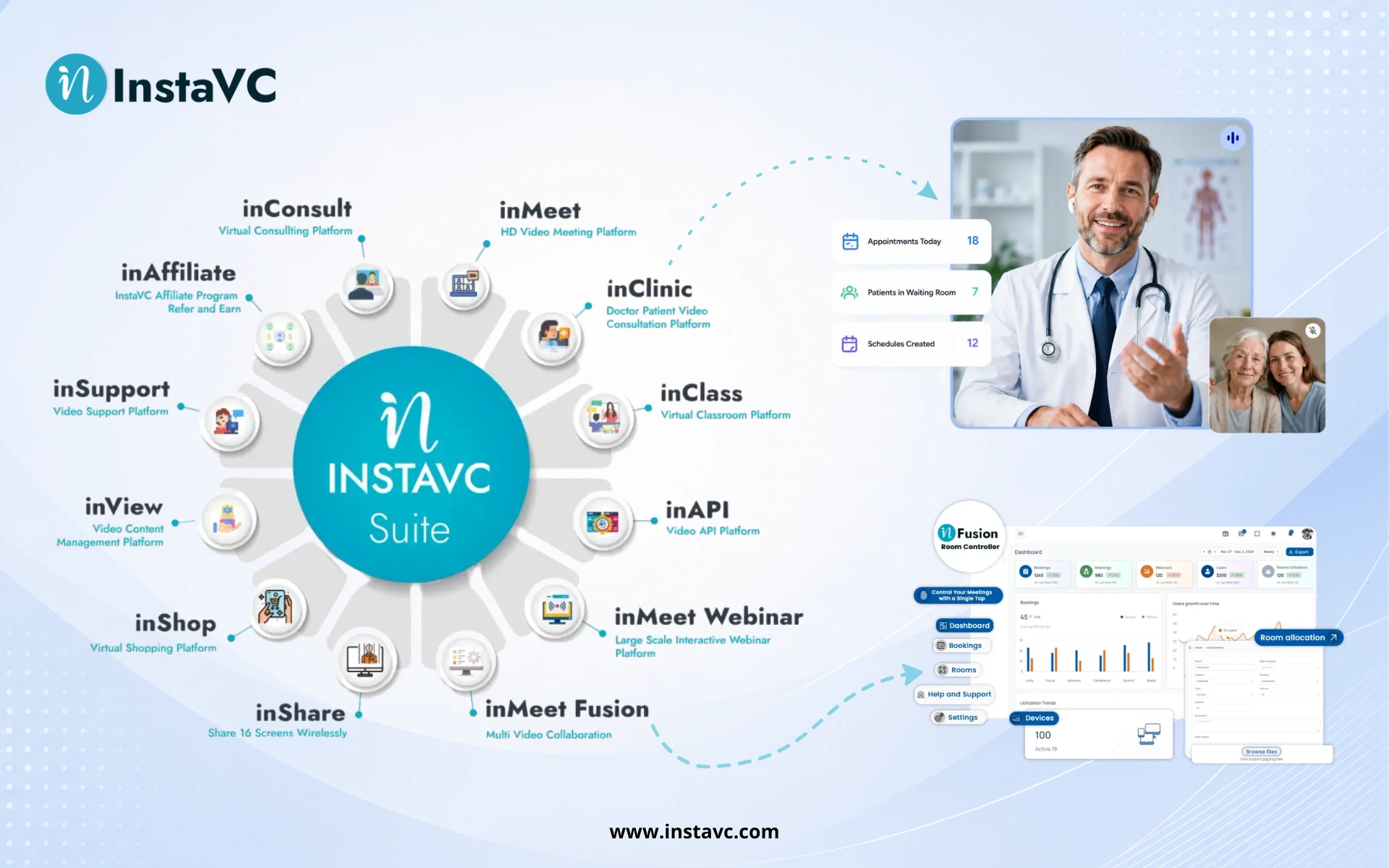
InstaVC Video Conferencing Solutions
InstaVC provides video communication solutions designed for different business and industry requirements.
Its solution portfolio includes video meeting, collaboration, communication, education, healthcare, retail, and video API capabilities.
inMeet
inMeet is designed for online video meetings and collaboration, supporting organizations that need virtual meetings and remote communication.
Want to see this in action? Book a personalized demo.
inFusion
InstaVC’s collaboration capabilities can support organizations looking to combine video communication with broader collaboration workflows.
Want to see this in action? Book a personalized demo.
inClass
Education-focused video communication can support virtual classrooms, remote learning, online teaching, and educational collaboration.
Related: classroom management software for modern education
inClinic
Healthcare-focused video communication can support virtual healthcare interactions and remote consultations.
Need help implementing this strategy in your workplace? Reach out to our experts.
inShop
Retail-oriented video communication can support communication between customers, stores, teams, and remote experts.
Related: virtual shopping platform: the complete guide
inLynk
inLynk can support communication and collaboration requirements across organizational environments.
inAPI
Organizations that want to add video communication to their own applications can explore video API capabilities for embedded communication and application integration.
Related: why use a video API? A complete guide
Video Conferencing Software vs Video Meeting Software
The terms video conferencing software and video meeting software are often used interchangeably, but they can describe slightly different scopes.
Video meeting software generally focuses on conducting online meetings.
Video conferencing software can refer to a broader communication platform that includes meetings along with collaboration, recording, administration, integrations, APIs, analytics, room systems, and industry-specific capabilities.
For organizations, the important consideration is not the terminology but whether the platform provides the capabilities required for their communication workflows.
Video Conferencing Software vs Traditional Meetings
Traditional in-person meetings require participants to be physically present in the same location.
Video conferencing allows participants to communicate remotely while seeing and hearing each other in real time.
| Requirement | Traditional Meeting | Video Conferencing |
|---|---|---|
| Physical presence | Required | Not required |
| Travel | Often required | Usually not required |
| Remote participation | Limited | Built in |
| Screen sharing | Additional equipment | Usually available |
| Recording | Additional setup | Often built in |
| Multi-location meetings | More difficult | Easier |
| Scalability | Location-dependent | Network/platform-dependent |
Video conferencing does not completely replace face-to-face communication. Instead, it provides organizations with another way to communicate when physical meetings are impractical or unnecessary.
What Should Businesses Look for in Video Conferencing Software?
Modern businesses should evaluate video conferencing software based on more than basic video calling.
Key areas include:
- AI-assisted meeting capabilities
- Intelligent noise reduction
- Automated transcription
- Meeting summaries
- Advanced analytics
- Secure authentication
- API and SDK availability
- Cloud and on-premise deployment
- Hybrid work support
- Interoperability
- Integration capabilities
- Accessibility
- Scalability
- Enterprise administration
AI features should complement the meeting experience rather than replace the fundamentals of reliable video, audio, security, and usability.
Frequently Asked Questions
What is video conferencing software?
Video conferencing software allows people in different locations to communicate using real-time video and audio over the internet or a private network. Modern platforms may also provide screen sharing, recording, messaging, collaboration, security, analytics, and integrations.
What is the best video conferencing software for businesses?
The best solution depends on the organization’s requirements. Businesses should evaluate participant capacity, video and audio quality, security, integrations, deployment options, administration, scalability, and total cost before selecting a platform.
What features should video conferencing software have?
Important features include HD video and audio, screen sharing, recording, chat, collaboration, meeting controls, security, administration, integrations, analytics, and API capabilities.
Is cloud or on-premise video conferencing better?
Neither option is universally better. Cloud platforms can simplify deployment and scalability, while on-premise platforms can provide greater infrastructure and data control. The right choice depends on organizational requirements.
Is video conferencing secure?
Video conferencing can be secure when the platform and organization implement appropriate authentication, access controls, encryption, administrative policies, and data protection measures.
Can video conferencing be integrated into other applications?
Yes. Video APIs and SDKs can allow organizations to integrate real-time video communication into websites, applications, portals, healthcare systems, education platforms, and other software products.
Can video conferencing support hybrid work?
Yes. Video conferencing is one of the core technologies used by hybrid organizations to connect employees working from offices, homes, meeting rooms, and other locations.
What is the difference between video conferencing and video calling?
Video calling generally describes a direct video communication session between individuals or small groups. Video conferencing usually refers to a broader meeting environment supporting multiple participants and collaboration capabilities.