
A Video Conferencing API, often referred to as a video call api, is a ready-made software component that allows developers to add real-time video calling, meetings, and communication features to any app or website without building the technology from scratch.
Think of it as installing a powerful engine into your application instead of building one from the ground up. The API handles all the technical complexity—connecting users, transmitting video and audio, synchronizing streams, and maintaining call quality—so your team can focus on design, user experience, and innovation.
Whether you are building a telehealth app, an online education platform, a customer support tool, or enterprise collaboration software, a Video Conferencing API provides everything required to power smooth, secure, and scalable video communication.
Table of the Content:
- What Does a Video Conferencing API Actually Do?
- 7 Core Features of Video Conferencing API
- Why Business Use Video Conferencing API?
- Should I be Using Video Conferencing API in my Business?
- How Difficult is to Integrate a Video API in Software?
- How Much It Cost to Use a Video Conferencing API?
- Integrate All Video Features In Your Software With inAPI
- FAQs
What Does a Video Conferencing API Actually Do?
When you use an app to make a video call, the connection feels instant. However, a lot of complex work happens in that split second. You do not see it, but the Video Conferencing API is managing the entire journey of the call from start to finish. Here’s a glimpse of what such API does behind the scenes:
- It establishes the connection: Before any video can appear, the two devices must find each other. The API acts as a messenger to locate the person for the WebRTC video call and creates a secure, digital tunnel between your device and theirs using a webrtc based video api.
- It compresses the video data: Raw video takes up a lot of digital space. A high-quality video file is too heavy to send over the internet in real-time. If you tried to send it without changes, the call would freeze immediately. The API takes the images from your camera and shrinks the data size instantly. It packages this information into small, manageable bundles that are light enough to travel fast.
- It transmits the information: Once the data is packaged, the API sends it through the internet. It makes sure video bundles and the audio bundles arrive at the exact same time. This is critical because if the audio arrives even a millisecond later than the video, the sound will not match the movement of the person’s lips. So it keeps everything perfectly synchronized.
- It adapts to internet speed: Internet connections are rarely stable. So the API monitors this connection every second and adjusts it accordingly. If your internet speed drops, it automatically lowers the video quality just enough to keep the audio clear. It prioritizes low latency video to keep the conversation going smoothly over having a perfect picture.
7 Core Features of Video Conferencing API
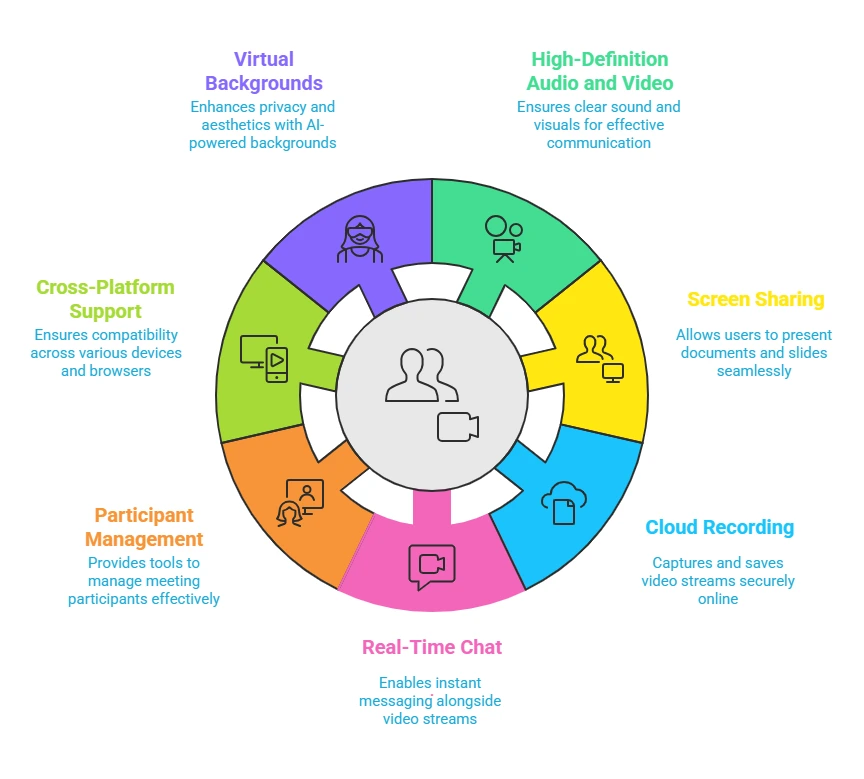
When you use a virtual meeting api or a group video call api, you are getting a complete set of tools to make the meeting useful and interactive. Here are the essential features included in most standard packages:
- High-Definition Audio and Video capabilities: This module automatically handles the complex work of capturing and delivering crystal-clear sound and visuals. It manages the data compression so that developers do not have to write code for processing millions of pixels.
- Screen Sharing capabilities: This feature provides a ready-made tool that captures exactly what is on a user’s computer screen and broadcasts it to others. Developers can simply switch this function on to let users present documents or slides. This eliminates the need to build a complex screen capture engine yourself.
- Cloud Recording capabilities: The API includes a recording system that captures the video stream and saves it directly to a secure online server. This allows developers to offer playback functionality to users immediately after a meeting ends. It removes the burden of managing massive storage hard drives for your own company.
- Real-Time Chat capabilities: This bundle adds a text messaging layer that runs perfectly alongside the video stream. It provides the infrastructure to send instant messages, emojis, or links without interrupting the conversation. This ensures that the real-time communication api functions seamlessly on two channels at once.
- Participant Management capabilities: This set of controls gives the host the power to manage the people in the room. It provides the pre-written logic needed to mute noisy microphones or remove unwanted guests. Developers can use these commands to easily build an admin panel for meeting hosts.
- Cross-Platform Support capabilities: Whether you use a mobile video sdk or a browser video api, this capability ensures that the video code works on every device, from phones to web browsers. The API library contains the specific instructions for each operating system. This allows the developer to write the code just once and have it run everywhere.
- Virtual Backgrounds capabilities: This advanced module uses artificial intelligence to distinguish the user from their surroundings. It allows developers to add features like background blurring or image replacement with a single command. This helps users maintain privacy without the developer needing to become an expert in computer vision.
Why Business Use Video Conferencing API?
Here are the main reasons people choose an api for video conferencing instead of building it themselves.
1) It Saves Development Time
If a company decides to build its own video engine, it can take a year or more to complete. This is because they have to write millions of lines of complex code. By using webrtc integration, developers can skip this entire building phase.They can simply plug the finished technology into their app. This allows them to launch their product in weeks instead of years.
2) It Reduces Upfront Costs
Building video infrastructure requires expensive physical servers. You have to buy powerful computers to process the video data. You also have to pay to keep them running twenty-four hours a day, even if no one is making a call. With an API, you do not buy any servers. You usually pay a small fee only for the minutes of video you actually use.
3) It Solves Complex Technical Problems
Video data is very heavy and difficult to move. It often gets stuck when internet connections are weak or when firewalls block it. An API provider has already solved these difficult problems. They have built a global network of servers that ensures the live video api flows smoothly. A regular company would struggle to build a network this reliable on its own.
4) It Handles Maintenance and Updates
Technology changes very fast. New phones come out every year, and web browsers update constantly. Every time this happens, the video code might break. If you build it yourself, your team has to constantly fix these breaks. When you use an API, the provider fixes them for you. You get the updates automatically without doing any extra work.
5) It Scales Instantly
When an app becomes popular, thousands of people might try to use it at the same time. If you built the system yourself, your servers might crash under the pressure. An API handles this pressure for you. It can support two people or two million people instantly without you needing to change anything.
Should I be Using Video Conferencing API in my Business?
Absolutely! You should use an embed video api to add one of the best video calling solutions to your software immediately. This allows you to add professional video features while keeping your team focused on your actual product.
Building video technology from scratch is incredibly complex and expensive, often distracting developers from their primary goals for months or even years. By using an API, you offload all the difficult technical responsibilities like security and connection stability to experts who manage it for you.
This approach helps you create a custom video conferencing app where you can design a custom video call layout that perfectly matches your brand identity. Ultimately, it provides the fastest path to launching a reliable and high-quality application without the heavy financial risk of developing the infrastructure yourself.
How to Get Started With Video Conferencing API Today?
Integrating a video system might sound like a massive engineering project, but the process is actually quite standardized. Here is the practical path to getting started.
1) Select your Video Conferencing API provider
The first step is to choose the company that will power your video infrastructure. You have many options ranging from large global companies to specialized video meeting software api platforms. You should look for a provider that offers good documentation and a pricing model that fits your budget.
2) Get your API credentials:
Once you choose a provider, you will sign up for a developer account on their website. After you register, the system will generate a set of unique digital keys for you. These keys act like a secure password that allows your specific application to talk to their cloud servers.
3) Install the software development kit:
You do not need to write the complex code for video transmission yourself. Instead, you will download a pre-made package of code called an SDK from your provider. This package contains all the difficult engineering work already finished and ready for you to use. You simply install this package into your application’s code base.
4) Initialize the video engine
With the kit installed, your developer will write a few lines of code to start the video engine. This step usually involves telling the app to use your unique API keys to authenticate itself. It establishes the connection between your user’s device and the provider’s network.
5) Create a digital room
The core concept of a video meeting api is the room. You will write a simple command that tells the API to create a unique digital space. This is the virtual meeting place where your users will connect with each other.
6) Run your first test
The final step is to run the application and test the connection. You can open your app on two different devices and have them join the room you just created. If you see video and hear audio on both ends, your video conference integration is successful.
How Difficult is to Integrate a Video API in Software?
Integrating a Video Conferencing API is designed to be a manageable task for any competent developer.
The process does not require them to be an expert in video engineering. Providers like inAPI supply a complete set of tools known as a Software Development Kit. This kit contains the complex code needed to handle video streams so the developer does not have to write it.
The developer simply installs this package into their existing application. They then use secure access keys to link their software to the provider’s cloud system. Because the difficult backend infrastructure is already working, a basic integration can often be completed in a few hours. This allows the developer to focus on designing the user interface rather than solving connectivity problems.
How Fast Can You Build an App With Video API?
Using a Video Conferencing API drastically reduces the time it takes to launch your application. If your team tried to build a reliable video system from scratch, it would likely take them many months or even over a year of complex engineering work. By using an API, you skip this entire development phase because the heavy lifting is already done for you. Your developers simply plug the ready-made video features into your app instead of inventing them. This efficient process allows you to finish a project in just a few weeks instead of waiting a year.
How Much It Cost to Use a Video Conferencing API?
Most video conferencing APIs operate on a business model known as Software as a Service. This means you do not have to purchase expensive physical infrastructure or servers to get started. Instead, you usually pay a fee based on how much you actually use the software. The providers track the activity on your application and bill you accordingly. This allows your costs to stay low when you are small and scale up only as your business needs grow. This flexibility prevents you from wasting money on resources you are not currently using.
Integrate All Video Features In Your Software With inAPI
If you are looking for a video conferencing API provider who can help you build your application, you should consider using inAPI by InstaVC. This is a cloud based video call api that allows businesses to add video communication api features directly to their own websites or apps. It acts like a bridge that connects your software to their powerful video technology.
inAPI is a remote meeting api that provides a video conference api for apps that developers can plug straight into your code. You do not need to build the video technology yourself. Because it is hosted on the cloud, you can access it over the internet and start using it right away without buying physical servers.
You can start using inAPI today to transform your software. Contact our team now to request your access keys and see how easy it is to get started.
FAQ
What is a Video Conferencing API?
A Video Conferencing API is a pre-made software tool that lets you add video calling features to your app or website. It acts like a digital building block so developers do not have to build the technology from scratch. This allows you to launch video applications much faster.
How does a Video Conferencing API work?
The API creates a secure digital connection between two devices over the internet. It shrinks large video files into small data bundles so they can travel quickly without freezing. It also keeps the audio and video perfectly synchronized so the sound matches the image.
What are the key features of a Video Conferencing API?
Most APIs come with essential tools like high-definition video, screen sharing, and real-time chat. They also include features for recording meetings and managing participants, such as muting microphones.
What is the difference between a Video API and a Video SDK?
The API is the engine that handles the connection and data transfer behind the scenes. The SDK, or Software Development Kit, is the package of code and tools you actually download and install to build the features.
How secure are Video Conferencing APIs?
These APIs are very secure because they create a private digital tunnel for every call. The provider manages complex security tasks to ensure that only invited guests can join the meeting.
Can I integrate a Video Conferencing API into mobile and web applications?
Yes, these APIs are built to work smoothly on both mobile apps and web browsers. They contain specific code that allows the video to function on phones, tablets, and computers. This ensures your users can join a call from any device they prefer.
How do I choose the right Video Conferencing API for my needs?
You should look for a provider that offers clear documentation and a pricing model that fits your budget. Make sure they offer the specific features you need, such as recording or screen sharing. It is also smart to test their connection quality before you commit.